This may be very well a problem with my setup and not ClrMAME itself, but maybe one of you had a similar problem and knows a workaround.
For years I've been using VMware Fusion on macOS (for Intel based machines) with a feature called "shared folder" to make an external drive accessible for scanning. Having exchanged my old Mac mini for a newer model using Apple Silicon, I noticed that the current version of Fusion does not support that feature.
A way to get around is to use macOS's built-in SMB file server and access the files using Windows built-in SMB client. I'm now able to access all the files on the disk from Windows and ClrMAME sees the whole folder hierarchy as documented in the screenshot below:
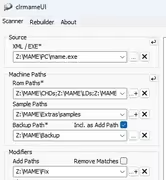
But running a scan results in the following error:
error analyzing . failed due to directory_iterator::directory_iterator: Invalid Signature.: "."Does somebody have an idea what's going wrong here?